
The steps involved in getting Citrix installed on Fedora 16 are not that much different to the steps involved in Fedora 14. The major difference is that it is now called Receiver for Linux 12.0 and not ICAClient, Citrix Linux client. As of now you can find the product page here here here. Once you download the file click on it in Dolphin and the application manager will install it.
yum install --nogpgcheck ./ICAClient-12.0.0-0.i386.rpmyum install --nogpgcheck ./ICAClient-12.1.0-0.i386.rpm
The location of the application has also changed to /opt/Citrix/ICAClient/wfica.
I ran into more problems with missing libraries
# ldd /opt/Citrix/ICAClient/wfica | grep -i "not found"
        libasound.so.2 => not found
Which I installed using the command
yum install libasound.so.2
I didn’t have any of the usual certificate issue this time.
Fedora 17 you probably won’t see that error but it fails to load you will see errors related to selinux. The first part is to run the following commands as root:
# grep wfica /var/log/audit/audit.log | audit2allow -M mypol
# semodule -i mypol.pp
The next error is a permissions issue related to All_Regions.ini:
“Cannot find the file: (/home/{your home}/.ICAClient/All_Regions.ini). Please check your installation, or contact your help desk.”
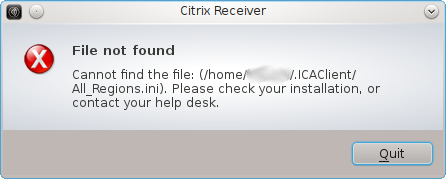
After reporting the bug and getting a very prompt reply (props to Miroslav Grepl) with the fix:
restorecon -Rv ~/
Thanks for this information, my switch from the windows world becomes easier every day.
Thanks for the info! I’m switching from Ubuntu to Fedora for test purposes and this was very good information to get the Citrix portal up’n running!
Just ran this on Fedora 17:
# yum install alsa-lib ./ICA……rpm
Worked perfectly. Just an update for those looking for Fed 17 info.
thanks for the update, Burt, that worked perfectly for me in Fedora 17!
Thanks for the post!
And the link to Citix’s software. That site is a mess.
Pingback: Change over to Fedora 17 « Resa's Blog
Guys, the updated URL points to the 12.0 downloads. Are you suggesting that 12.0 is better than 12.1 and stay at the lower version?
Nope. Just that was the current version at the time
Thanks for the post! Really helped.
I used Citrix do connect my work with Ubuntu without problems. I changed to Fedora a month and since this day I wasn’t connect. I read a lot of articles about the problem, but the only I had success was this.
Thank’s for your help.
Nivaldo Lima
I had to install libpng12.i686 to get Citrix Receiver to work on Fedora 19 and 20. This was my last requirement to move from M$ to Linux.